Check FESCO bill online to view your electricity bill, see the due date, and download a duplicate bill instantly. Manage your all bills in Pakistan quickly with this simple guide.
Complete Guide to Check FESCO Bill Online | June 2026
If you want to check FESCO bill online, the process is very easy. You can see your electricity bill, check the due date, and download a duplicate bill using your 14-digit reference number or consumer ID. No need to wait for the paper bill.
Fesco Bill Check Online
Check your electricity bill online
Select Bill Type
Reference No
14-digit reference number from your bill
Customer ID
10-digit customer identification number
Please enter your 14-digit reference number
Fetching your FESCO bill details…
Please enter a valid 14-digit reference number.
Bill Found Successfully!
Reference No
—
Bill Month
—
Due Date
—
Units Consumed
—
Total Payable
—
© 2026 fscobill.com – All Rights Reserved. Not officially affiliated with FESCO.

How to Check FESCO Bill Online
| Step | Action |
|---|---|
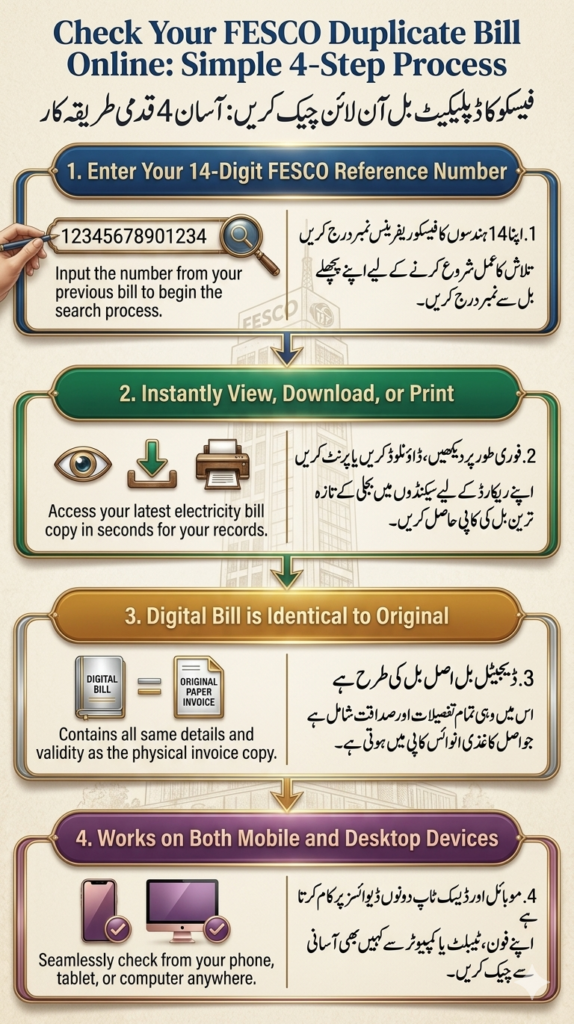
| 1 | Enter your 14-digit reference number or consumer ID |
| 2 | Click on the Check Bill button |
| 3 | Your FESCO bill will appear instantly |
| 4 | Download or print your duplicate bill |
What You Need for FESCO Bill Check
- 14-digit reference number
- Consumer ID (optional)
Benefits of Checking FESCO Bill Online
- Instant access to your bill
- No waiting for paper bills
- Download and print duplicate bill anytime
- Check due date to avoid late payment
- Works on mobile, tablet, and desktop devices
Read more; Check FESCO Bill Online 2026 – Electricity Bill by Reference Number
How to Get FESCO Duplicate Bill
If you lose your paper bill, you can easily get a duplicate bill online. Just enter your reference number or consumer ID, and click on Check Bill. You can then download or print your bill.
How to Receive FESCO Bill via Email
- Enter your email address and reference number
- Click Submit
- Your bill will be sent automatically to your inbox every month
How to Receive FESCO Bill via SMS
- Type:
pitc <space> <14-digit-reference-code> - Send to: 8334
- You will get your bill details via SMS
How to Pay FESCO Bill Online
You can pay your bill using:
- JazzCash or Easypaisa
- Internet banking
- ATM machines
- Bank apps
- Credit card
Taxes in FESCO Bill
| Tax/Charge | Details |
|---|---|
| Electricity Duty | 1.5% of units consumed |
| Fuel Price Adjustment (FPA) | Changes with fuel cost |
| GST | 17% of total bill |
| Tariff Rationalization (TR) | Adjusts tariff gap |
| Financial Cost (FC) Surcharge | Rs. 0.43 per unit |
| TV Fee | Rs. 35 fixed |
| Quarterly Tariff Adjustment (QTA) | Applied every 3 months |
Tips to Reduce Your FESCO Electricity Bill
- Unplug chargers when not in use
- Turn off lights in empty rooms
- Use energy-efficient appliances
- Keep AC at 26°C or lower
- Avoid using electricity during peak hours

FAQs
How can I check FESCO bill online? Enter your reference number or consumer ID to view your bill.
Can I download and print my FESCO bill? Yes, you can download and print it easily.
Can I get my bill via email or SMS? Yes, FESCO offers email and SMS services for bills.
What are the payment methods for FESCO bills? You can pay via JazzCash, Easypaisa, bank apps, ATM, or credit card.

Conclusion
Checking your FESCO bill online is fast, free, and convenient. You can view, download, and pay your bill anytime using your reference number or consumer ID.
For official details, visit the FESCO website.
